 Skip Navigation

Can AI Laugh?
Duration: 45 minutes
Grade Levels: K–2
Is AI capable of empathy and emotion? This activity supports young learners to develop basic AI literacy by helping them distinguish between different uses of human intelligence and artificial intelligence.
Grade Levels: K-2
Duration: 45 min
Concepts/Skills: Artificial intelligence, social emotional learning, pattern recognition
Objectives:
- Distinguish between the capabilities of humans, artificial intelligence, and other tools
- Notice that artifical intelligence and other electronic tools do not have empathy and emotion like humans do
Background Information
Artificial Intelligence (AI) most often refers to a device or program designed to mimic aspects of human intelligence to complete complex tasks, make decisions, or interact with humans. AI can even be found in toys for children. Many of these AI toys have similar characteristics: features that mimic human emotion and connection, the ability to collect data on child users, and unreliable interactions with children. However, humans have unique abilities that distinguish us from machines, including empathy, creativity, and emotion. Though AI toys can mimic some of these characteristics, they do not have these abilities.
As AI enabled toys come on the market, young children need opportunities to determine appropriate uses of AI. Gaining the skills to distinguish this relies on understanding that even if AI mimics characteristics like emotion and creativity, it cannot have emotions or be creative. These concepts are the first steps in supporting children to develop AI literacy.
For more resources on AI toys see resources from Common Sense Media and the MIT Media Lab.
 Materials
- Human vs. Non-Human cards (1 set per 2-3 students)
- Lesson Slides (1 per teacher)
- Uses image prompts
- Feelings image prompts
- Inside an AI toy
- Dry erase board and markers (for teacher)
 Preparation
- Review the lesson overview and the image prompt slides.
- Choose one of the two focus areas for the activity “Uses” or “Feelings”
- We recommend starting with the set of Uses cards prompts first
- Print the Human vs. Non-human cards
- Students can do this activity in pairs or small groups. Print one set of sorting cards and one set of image cards per pair or group.
- Try sorting the cards yourself for each prompt. This will give you practice with the materials to be able to anticipate student questions.
- Choose which sorting activity you will use with your students: uses or feelings
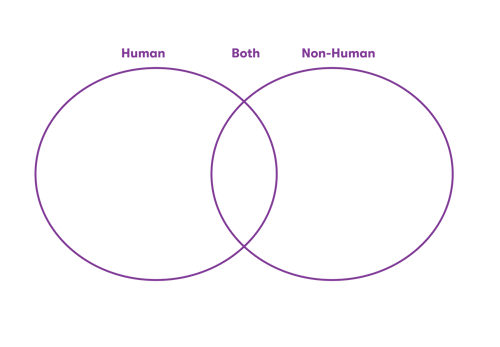
- Make a Venn diagram on the board or on an editable slide. Label the Venn diagram according to the image below
 Lesson Directions
Outline
Frame the Activity |
10 min total |
|
Activate Prior Knowledge |
7 min |
|
Introduce the Activity |
3 min |
Class Sorting Activity |
20 min total |
|
Sorting activity and filing out ven diagram |
15 min |
|
Debrief |
5 min |
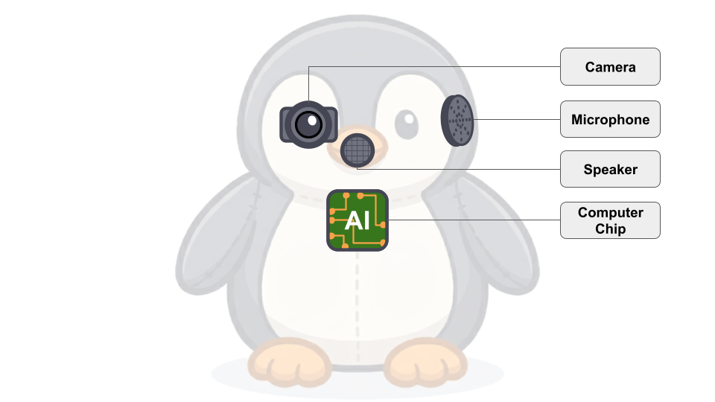
Inside an AI Toy |
10 min total |
 Frame the Activity
Activate Prior Knowledge (7 min)
- Ask students to compare a stuffed animal and person.
- Are a stuffed animal and a person the same?
- How are they different?
- If students describe only physical characteristics, encourage them to think about how they are used and what they can do by asking some of these questions:
- What can a stuffed animal help you with?
- Can a stuffed animal help you sleep better at night? Can a stuffed animal make you a snack before bedtime?
- What can a family member help you with?
- Can a family member help you sleep better at night? Can a family member make you a snack before bedtime?
- What can a stuffed animal help you with?
- Have students share what they know about robots and artificial intelligence:
- How do you and your family use computers to help with tasks?
- Are there computers that can talk to you?
- Students may notice common computer assistants like Siri, Alexa, Echo etc
- Introduce the term artificial intelligence (AI) and explain that sometimes it is used by computers or even toys to help them look things up, talk, play music.
- Point out that toys that use AI may appear like humans - they can talk to you, move, and even play.
- They can also do many other things computers can do. But these toys are like stuffed animals, not people.
Introduce the Activity (3 min)
- Tell students that to help them think about what makes something human, they are going to do an activity in which they sort cards:
- Human and Non-human
- Let them know you will ask them a question and they will find the cards that they think can do that thing.
- Demonstrate the sorting activity for students by doing one of the prompts in front of the class.
- Use Slide 8 (uses) or Slide 13 (feelings) to show them the question and repeat the options available on the human and non-human cards.
- Demonstrate how you would analyze the question and then sort to decide which cards have the characteristics in the prompt.
- Address any questions that students have about the sorting game.
- Divide students into pairs or small groups and pass out the sorting cards. Let them know they will work as a team to make a decision.
 Class Sorting Activity
Sorting and Venn Diagram (15 min)
- Project the first prompt. Tell students to pick the cards that apply to the prompt.
- They can hold them up or put them in one spot on their table.
- Depending on your focus for this activity you may use some of the following questions to help students choose their cards:
- Uses prompts: “Who or what is best…” “Who or what would be most helpful”
- Feelings prompts: “Who or what can” or “Who or what is most likely to…”
- Give pairs 1-2 minutes to make a decision. Then have them hold up their cards or hold up their hands for you to come see how they sorted.
- As they share, place their responses on the Venn diagram.
- “It looks like most of you said that humans would be most helpful for…”
- Have some volunteers or students share why they made their choices.
- There will be some items where students identify that humans and nonhumans are both useful in different ways.
- If you see a variety of responses, put that prompt in the middle of the Venn diagram and have some students share why they made those decisions.
- Continue the same process for the rest of the prompts.
|
Tips:
|
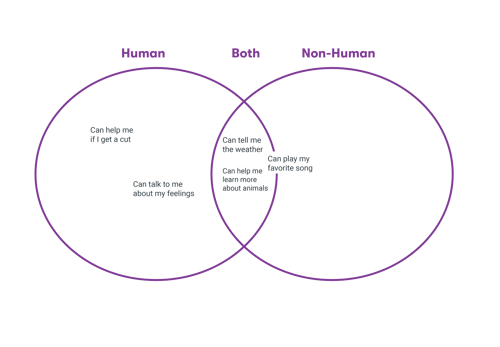
Sample Venn diagram
By the end of the activity, the Venn diagram may look something like this (uses).
|
A note for Feelings Prompts “I’m sad (slide 13)” and “feel sleepy” (slide 17). AI toys can say or communicate these things, but cannot actually feel them. One way to clarify this for students is to ask them, "When you feel sad or sleepy, what happens in your body?"
Emphasize that humans can have these physical reactions, but AI robots cannot. |
Debrief (15 min)
- At the end of the activity, ask students:
- What do the things in the human section have in common?
- How are they different from the non-human things?
- What are some examples of things both humans and non-humans can do?
Inside an AI Toy (10 min)
- Remind students that, though AI toys can do many things humans can do, and may sound human, they contain the same parts as computers.
- If students need reminders, refer to some of the prompts in the both category.
- Project the slide (after the prompts) showing the unlabeled inside of an AI toy. Ask students what they see inside the toy.
- Students may say things like: wires, a camera, a battery, computer parts.
- Project the slide showing the labeled inside of an AI toy. Go through a few of the labeled parts of the toy.
- This is the camera. What do we think it does?
- This is the speaker? What do we think it does?
- This is the plug? What do you think it does? Why do you think the toy sometimes needs to be plugged in?
Standards Connections
| SEL Standards | ||
| Grade | Performance Expectation | Description |
| Early Elementary | 3.A.1 |
3.A.1 Students discuss similarities and differences between themselves and others and different social and cultural groups. |
| Early Elementary |
3.B.1 |
3.B.1 Students recognize and name emotions in others using verbal and physical cues. Students describe how others may feel in a variety of situations and show empathy for others’ experiences. |
Vocabulary
| Term | Definition |
|
Artificial intelligence (AI) |
A device or program designed to mimic aspects of human intelligence to complete complex tasks, such as learning, problem solving, and decision making. |
|
AI toy/robot |
Toys that use AI to talk and play with you. |
|
Emotion |
Feelings that humans have, like being happy or sad. |
Looking for more computer science resources?
Try one of our Content Bundles
Artificial Intelligence
What is AI?

Computational Thinking
Get with the (computer) program

Data Science
Byte into these
