 Skip Navigation

User-Centered Design: Playtest a Game
Duration: 60 minutes
Grade Levels: 4th-12th grade
This lesson was developed for The 2027 Tech Challenge: Game On!

Students become game designers and playtest a game prototype with a real-life user. They will make preparations, conduct multiple rounds of playtesting, and have a feedback chat with their user. Afterward, the students will summarize their test findings and create an iteration plan for their next prototype.
Concepts/Skills: User-centered design, empathy, engineering, prototyping, testing
Objectives:
- Use empathy to understand the needs of a specific user
- Define additional criteria and constraints based on their user
- Critically analyze user feedback and testing results to refine their designs
Background Information
This resource is part of an activity sequence designed to help you support a team of students through the key phases of a user-centered design process.
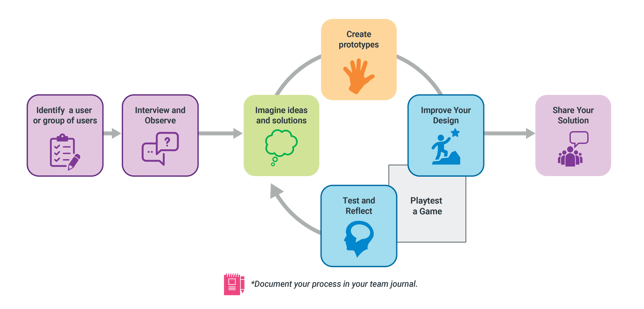
For simplicity, the examples given in the guide are based around the idea of designing a game. However, these resources can be used to design everything from a chair, a toy, an airplane, or a playground.
IMPORTANT: Before doing the activities in this guide, students should have already chosen and interviewed a user and built a prototype they are ready to test.
See the end of this resource for more activities within this sequence.
User-Centered Design
Designers and engineers often use empathy, the ability to understand a user’s perspective, in order to make the best possible products. This is called user-centered or human-centered design.
For example, game designers might test their game by having real people play it. The goal of playtesting is to let the user try the game so designers can see their real reaction. It is an opportunity for the team of designers to find out what is confusing or broken so they can fix it in their next prototype.
 Materials
- Game prototype (1 per team)
- Pens, pencils, makers (1 set for each team and their user)
- Notebook or Team Journal (1 per team)
- Playtest Notes Handout (1 per student)
- Iteration Plan Handout (1 per team)
- Optional:Whiteboard, poster paper, or multiple sheets of blank paper
 Preparation
- Before working through the activities in this guide, make sure each team has interviewed a real-life user and drafted part of a prototype.
- (Looking for tips on running a user interview session? Check out our Know the Player Lesson)
- Help the team set a time to meet their user for the playtesting session
- Print at least one copy of the Playtest Notes Handout (Optional: print multiple copies of the Observation page on page 1) and at least one copy of the Iteration Plan Handout.
- Encourage the team to get their prototype ready for testing.
 When is the team ready to playtest?
You do not need a finished game to playtest! Teams can test as soon as they have a rough, low-fidelity prototype of their core mechanism. Testing early with cardboard and tape is better than waiting until the game is fully decorated. If a mechanical part isn't built yet, a team member can simply act as the mechanism (e.g., manually dropping a ball when the user hits a button).
What if the user that the team interviewed is no longer available for playtesting?
While it is ideal to interview and playtest with the exact same person, we know that coordinating schedules can be difficult and volunteers sometimes become unavailable. Don’t let this block your team from playtesting with a different user!
For teams participating in The 2027 Tech Challenge, see the FAQ for more guidance.
 Supporting multiple teams
In a classroom or afterschool program where you are supporting multiple teams of students, consider when and how you might coordinate playtesting with users:
- During class: Pair teams up to playtest with other teams.
- Homework: Have teams conduct playtesting individually or in small groups outside of class time and bring their completed handouts to class.
- Special Guest: Coordinate one or more special guest speakers for the entire class to playtest with.
Tip: User and team pairings do not need to be exact.
- Team members can all playtest with different users, bring their findings back to summarize next steps together.
- Similarly, multiple teams can playtest with the same user, but get different feedback from them.
Outline
Playtesting Preparation |
15 min total |
Playtest with the User |
30 min total |
| Step 1: Observation | Up to 3 minutes |
| Step 2: Guided Play | Up to 3 minutes |
| Step 3: Feedback Chat | Up to 3 minutes |
Iteration Plan |
15 min total |
Note: The activities in this guide do not need to be conducted during one continuous session.
 Lesson Directions
Playtesting Preparation (15 min)
The goal for this activity is that each team works together to develop a plan before they test their prototype. Encourage students to take the lead on organizing the logistics as well as thinking about what parts of their design they need to test.
- Have learners get into their Tech Challenge teams.
- If the class is not preparing for the Tech Challenge, have them get into teams of 2-6.
- Encourage the team to think first about their goals for playtesting:
- What parts of your prototype do you need to test
- What do you need to get feedback on from a real-life player?
- For example, the students may need to test a mechanism, or part of the directions for the game, or maybe just observe how a player uses the game pieces.
- In a notebook or their Team Journal, have students record the following information:
- How much time will you have with your user for playtesting?
- How many team members should be in the playtest? Do you need anyone to play the game as well, or can you test with just one player? Are there any reasons that the user might find it hard to talk if your whole team is there?
- Define Playtest Roles:
- Host: Introduce the playtest, give directions or tutorial, and lead the communication with the user
- Note-taker(s): Who is taking notes? And is your user OK with somebody recording video or sound?
- Timekeeper: Who will keep track of time?
- (Optional) Extra Player: If a game requires multiple players, one team member can step in to play.
- (Optional) Mechanic: Fixes components of the prototype that break in real-time if needed.
- Have teams review the Playtest Notes Handout and different steps of playtesting. Make sure they understand what can happen during each step. It may be useful to demonstrate this process with students by having some volunteers do a playtest for the larger group.
- Students can also consider if there are other activities they want to include as part of the playtest. They may want to see an example of how their player performs a certain action for example.
- As a final preparation step, team members can practice playtesting with each other before meeting their user. If the team has time, you can even provide feedback to them during these practice interviews.
 Tip: Preparing the Prototype for Playtesting
Before the player arrives, encourage the team to check as they prepare their prototype for playtesting:
- Ask the team
- “Are there any parts that the player could touch and hurt themselves?” and have the team find and fix any sharp edges or pointy ends.
- Ask the team
- “Which moving part is most likely to break?” and encourage them to reinforce those specific weak points with extra material.
- Remind the team that the playtest is a way to get more data about their design.
- If a part breaks during playtesting, encourage the team to explain that the player did nothing wrong and help the team celebrate the discovery!
Playtesting with the user (20 min)
- Make sure students have everything they need to conduct the interview. This includes:
- Copies of the Playtest Notes Handout for each team member.
- Audio visual tools if they have decided to record video or sound.
- Their game prototype
- Any additional resources they need for observations or activities.
- Have students conduct three steps of playtesting together (see the column for details).
- While the user is playing, encourage the team to pay attention to the following:
- Where did the player get stuck or confused?
- Did the user interact with the game the way the team expected?
- Did anything break or jam during the test?
- Bring back the Magic Words of interviewing: If the player's feedback is too brief, prompt your team to ask: "Tell us more," "Why?" or "Can you show us what you mean?
The Playtesting Process
|
Step 1 Observation |
The Host(s) give the player the game with minimal instructions. The goal is to watch how the user tries to play and where they get stuck. |
|
Step 2 Guided Play |
The team fully explains the rules and mechanics, helping the user navigate any unfinished or broken parts of the prototype. |
| Step 3 Feedback Chat (10 minutes) |
The team gets feedback from the player. Using the "I Like / I Wish / What If" framework helps engineers gather useful data while preventing them from arguing or getting defensive about criticism. |
 The Note-Taker(s) should be taking notes during the entire process.
 Tip: Emotions and Playtesting
Playtesting can be the most emotionally challenging part of a design challenge. Teams might pour hours into building their prototype, and seeing a user get confused or watching a mechanism jam can feel like a failure.
Your goal is to help the team understand that at this stage a confused player is not a failure; it is data. Be there to guide the conversation, manage defensive feelings, and ensure the team's hands (not yours) are the ones fixing the prototype.
 Tip: User Management for the Playtest
Share some of these tips with students if you think it is helpful to them:
When a player is “too nice” and only focuses on being supportive and encouraging, the team may not get useful data to improve their design. One strategy is to nudge the user to give more specific feedback.
- For example, by saying “We’re glad you like the design! Can you point to the exact part that was the most fun to use? And what do you think made the other parts less fun?”
When a player is a “fixer” and really wants to help they may end up dictating engineering solutions. Instead, gently redirect them to frame their ideas as “What ifs…” to keep possibilities open-ended.
- For example, “Instead of telling us to add a rubber band, can you frame that as a What if? Like, ‘what if the lever was easier to pull?’”
When a player is too blunt and gets frustrated during a playtest, keep a positive attitude as you help translate the direct feedback into objective data.
- For example, “This is exactly the data the team needs – let’s put that in the ‘I wish…’ column!”
 Adaptation for Advanced Engineers
Multiple Playesting Sessions
Help the team schedule and conduct multiple playtests at different stages of your prototyping. For example, early on in the game development process, they might want to try quick, low-fidelity materials and act out the mechanisms to test how the overall game feels for the player. Later on, once the team has prototyped their core mechanism, they might reconnect with the player to test the game’s functionality and consistency.
Interactive Feedback Chats
Instead of just asking the player questions, teams can also lead an interactive conversation with the player about their game. This may work especially well when they are testing a game with more than one player.
The team can set up a whiteboard, a large piece of poster paper, or three separate sheets of paper and recreate the three columns: I Like, I Wish, What If.
- Have the team use sticky notes or markers to write down the player's feedback together. This keeps everyone engaged and prevents one person from having to do all the writing.
- Standing together and putting the feedback on a wall helps the team look at the issues clearly. If they start arguing, remind them: "If the player is confused, it’s usually a design flaw that we can change, not the player's fault."
The Iteration Plan (15 min)
The next step in the process is for each team to organize what they learned from their playtesting and make decisions about how that will affect their design. Depending on the logistics of the testing, this may happen right away or as long as a week later.
- Before they begin iterating or redesign their prototype, remind teams that pausing and reviewing the feedback together is very important.
- Some of them may think everything is wrong, while others might have noticed that the player really liked certain parts of the design.
- Instead of immediately tearing the prototype apart, encourage the team to pause, review their notes, and commit to specific updates to improve their next prototype.
- Focusing on one or two realistic next steps can also keep the team from being overwhelmed or unsure of what to do..
- It may be helpful for the team to use a mindmap or stickynotes to organize the ideas that have come out of their user interviews.
- For example, each team member could write at least 5 key takeaways on sticky notes which they share with the rest of their team. They can then place the sticky notes in groups or a mindmap to organize similar ideas together.
- Have teams consider: What does this tell us about our users’ needs overall?
- Once they have summarized the results of their testing, have learners apply the ideas to their prototype and decide what adjustments to make to their design.
- Give each team the Iteration Plan Handout to help them think through their next steps.
- As the team analyzes their observation and feedback notes, ask what changes they plan to make, and how those changes will improve their game.
- What components are working in your team’s design?
- Where are the failure point(s)? What caused the failure?
- How can your team start to alter that part of the design?
- What are two things you want to remember from the player feedback?
- Teams participating in The Tech Challenge should make sure that they capture these notes and ideas in their Team Journal.
- Encourage them to debrief and reflect on the process as well. Possible Debrief Questions include:
- What did you learn about the process of user-centered design so far?
- What did you learn about your user that surprised you and helped you understand their perspective better?
More resources for User-Centered Design
Use these activities to follow the user-centered design process.

Interview and Observe
Use these resources to practice understanding and defining the needs of your user.

Imagine
Use some of these strategies to brainstorm and research the possibilities for a design.

Create
Engineering comes in lots of forms. For the 2027 Tech Challenge, use these resources to prototype specific mechanisms.

Share
Whether it’s a formal showcase or an interview, there are lots of ways to share designs.
Standards Connections
| Next Generation Science Standards | ||
| Grade | Performance Expectation | Description |
| 3-5 | ETS1-3 |
Plan and carry out fair tests in which variables are controlled and failure points are considered to identify aspects of a model or prototype that can be improved. |
| MS | ETS1-1 | Define the criteria and constraints of a design problem with sufficient precision to ensure a successful solution, taking into account relevant scientific principles and potential impacts on people and the natural environment that may limit possible solutions. |
| MS | ETS1-4 | Develop a model to generate data for iterative testing and modification of a proposed object, tool, or process. |
| HS | ETS1-3 | Evaluate a solution to a complex real-world problem based on prioritized criteria and trade-offs that account for a range of constraints, including cost, safety, reliability, and aesthetics as well as possible social, cultural, and environmental impacts. |
| Related Disciplinary Core Ideas |
ETS1.B: Developing Possible Solutions ETS1.C: Optimizing the Design Solution |
|
| Science and Engineering Practices |
Asking Questions and Defining Problems Planning and Carrying Out Investigations Analyzing and Interpreting Data Construction Explanations and Designing Solutions |
|
| Cross Cutting Concepts |
Patterns Cause and Effect |
|
| Common Core State Standards: English Language Arts | ||
| Grade | Anchor Standard | Description |
| 4 - 12 | CCSS.ELA-LITERACY.CCRA.SL.1 |
Prepare for and participate effectively in a range of conversations and collaborations with diverse partners, building on others' ideas and expressing their own clearly and persuasively. |
|
4 - 12 |
CCSS.ELA-LITERACY.CCRA.SL.2 |
Integrate and evaluate information presented in diverse media and formats, including visually, quantitatively, and orally. |
| 4 - 12 | CCSS.ELA-LITERACY.CCRA.SL.3 | Evaluate a speaker's point of view, reasoning, and use of evidence and rhetoric. |
| 4 - 12 | CCSS.ELA-LITERACY.CCRA.R.7 | Integrate and evaluate content presented in diverse media and formats, including visually and quantitatively, as well as in words. |
| 4 - 12 | CCSS.ELA-LITERACY.CCRA.W.7 | Conduct short as well as more sustained research projects based on focused questions, demonstrating understanding of the subject under investigation. |
Vocabulary
| Term | Definition |
| Criteria |
The requirements for success. |
| Empathy | The ability to understand and share the feelings of another person. |
| Failure | Sometimes you feel this when your device doesn't work, but a big part of engineering is finding failure points and fixing them. So running into a roadblock with your device is an opportunity to use your engineering brain to make your device even better. |
| Failure point | When a break in a system causes a device to work improperly or not work at all. One of the jobs of an engineer is to find failure points so they can fix them, and it's one of the reasons we test again and again. |
| Game | A fun, hands-on activity that has a clear objective, a way to score or succeed, and gives the player feedback on how they are doing. For The 2027 Tech Challenge, a game must be a portable, physical device that uses mechanical motion. |
| Iteration | The different versions of the device you build as it changes due to the Design Process. |
| Needfinding | The part at the beginning of the user-centered design process when you discover what your user actually needs. You do needfinding by practicing empathy, asking great questions in a user interview, and using careful observation. |
| Observation |
Watching a user carefully to see how they interact with things, instead of just listening to what they say out loud. Good observation means noticing behaviors—like if they struggle to reach something, use one hand more than the other, or look confused—so you can design something that fits them perfectly. |
| Perseverance | Not giving up in the face of failure. Your team may experience setbacks, but it doesn't have to give up. Getting past those failures can be fun and rewarding. |
| Playtesting |
The process of observing target users playing a game in development to evaluate the player experience, balance game mechanics, and uncover design flaws. |
| Prototype |
A first and usually functional form of a new type or design of a construction. As part of The Tech Challenge, teams will iterate and improve their prototypes until they find a final solution. |
| Repeatability | The ability of your device to demonstrate the same results under the same conditions, i.e. to work every time you test it. |
| Specifications |
Detailed descriptions of design criteria for a piece of work. |
| User (or Target User / Player) | The specific person, or group of people, you are designing your game for. In a user-centered design challenge, you cannot build a successful game by just making what you want or guessing what your user wants. You must interview your user to learn about their needs, and playtest with them to gain their feedback on your design. What you learn from them becomes the requirements and improvements your game must have to be successful. |
| User-Centered Design |
An approach to the design process that puts human needs, capabilities, and behavior first. Designers aim to develop empathy for their users and utilize techniques like interviews and observations. (Also known as human-centered design) |
| User feedback | The data your player gives you after trying your game. Feedback usually comes in three forms: what they like, what they wish was different, and new "what if" ideas. |
| User interview | A special conversation where your team learns from a user before brainstorming ideas or prototyping solutions. Instead of guessing, you ask your user questions to discover their wants, needs, likes, and dislikes. |

The Tech Challenge
This guide was created to prepare students for Tech Challenge 2027: Game On! Team advisers can use this resource to:
- Introduce their team to playtesting tools and processes.
- Familiarize students with best practices for playtesting and user-centered design.
Get started on this year’s Tech Challenge.